Tuesday, April 08, 2008

MSI Installer issue on SQL 2005 Setup

Error Message:
The Windows Installer Service could not be accessed. This can occur if you are running Windows in safe mode, or if the Windows Installer is not correctly installed. Contact your support personnel for assistance.
Source:
File:
C:\Program Files\Microsoft SQL Server\90\Setup Bootstrap\LOG\Files
• SQLSetup0001_BOXNAME_SQL.log
• SQLSetup0003_BOXNAME_SQL.log

MSI (s) (68:E8) [23:38:12:124]: Product: Microsoft SQL Server 2005 (64-bit) -- Error 1719. The Windows Installer Service could not be accessed. This can occur if you are running Windows in safe mode, or if the Windows Installer is not correctly installed. Contact your support personnel for assistance.

Resolution:
Error message when you try to add or remove a program on a computer that is running Windows XP or Windows Server 2003: "The Windows Installer service could not be accessed"

http://support.microsoft.com/kb/315346

Trap custom SQL 2005 Installation Success state

C:\Program Files\Microsoft SQL Server\90\Setup Bootstrap\LOG\Files>find /I "comp
leted successfully" SQLSetup0007*.log > Result.txt

Sunday, April 06, 2008

How to restore cluster's share resource

1. Right-click on the desktop and select New Shortcut.


2. In
the window that appears, find the path to the dsm.exe executable
(located by default in directory C:\program
files\tivoli\tsm\baclient\).
Note: If you type the path in, instead of using the Browse button, the path should be enclosed in double quotes. For example: "C:\Program Files\tivoli\tsm\baclient\dsm.exe"


3.
After
you enter the path and executable in the text field, add the following
information after the closing double quotes (add a space between the
double quotes and the following):
-optfile="x:\path\to\cluster\dsm.opt" This
identifies the proper Tivoli Storage Manager cluster options file you
want to use. This example assumes that the cluster options file is
located in the folder ″x:\path\to\cluster\″ and has a filename dsm.opt.


4.
The complete line in the text field now should look similar to the following: "C:\Program Files\tivoli\tsm\baclient\dsm.exe" -optfile="x:\path\to\cluster\ dsm.opt"


5.
Click Next and give this shortcut a meaningful name, such as Backup-Archive GUI: Cluster Group X.


6.
Click Finish.
A desktop icon should now be available. The properties of this icon
will show the following correct Target, as noted in step 4:
"C:\Program Files\tivoli\tsm\baclient\dsm.exe" -optfile="x:\path\to\cluster\ dsm.opt"

Saturday, April 05, 2008

Configuring SSIS to work on Named Instance

Configuring the Integration Services Service to work on named instance:

Modify the MsDtsSvrv.ini file - this is requires for SSIS for SQL2K5 named instance on SQL Server 2005.

File Location:
\90\DTS\Binn\MsDtsSrvr.ini.xml

Changes Requried on:
1) .
Instead of . that denotes default instance Named instance should be there.
Example:
ASQLBox\SQL2K5

2) ..\Packages
If we want to change the file storage location.
Example:
\\ASQLBox\SSISPackages

Reference: http://msdn2.microsoft.com/en-us/library/ms137789.aspx

Connetion to SSIS from client computer failed


Consider the following scenario. A server is running Microsoft SQL Server 2005 Integration Services (SSIS). From a client computer, you use SQL Server Management Studio to connect to Integration Services on the server. To connect to Integration Services on the server, you use a user account that is not a member of the Administrators group on the server. In this scenario, you receive the following error message:

Cannot connect to SSISServer
Additional information: Failed to retrieve data for this request (Microsoft.SqlServer.SmoEnum)
Connect to SSIS Service on machine "SSISServer" failed: Access is denied.

Refer solution at
http://support.microsoft.com/kb/940232/en-us

Error message when you install SQL Server 2005


Error message when you install SQL Server 2005: "The file C:\Windows\Microsoft.NET\Framework\Meaningless_string\mscorlib.tlb could not be loaded"

href="http://support.microsoft.com/kb/918685

Reason for the Error:
This issue occurs because the path of the Mscorlib.tlb file is incorrectly interpreted during the Setup process.

SQL Server 2005 64 Bit Standard Edition Memory

1)Do we really need AWE to get best performance on SQL 2005 x64 bit Standard Edition ?

No. AWE is not required on 64 bit operating system.


2) Can we configure AWE on SQL 2005 x64 bit Standard Edition?

Yes, if the O.S is 32 bit and memory you have is more than 4 GB.

No, if the O.S is 64 bit O.S.

3) Before configuring AWE we need to enabled Lock Pages in Memory Policy,

Can we configure this Policy with SQL Server 2005 64 bit Standard Edition?

Yes, if the O.S is 32 bit and memory you have is more than 4 GB.

SQL Server 2005 Standard edition do not support "Lock Pages in Memory" privileges on the SQL Service account.

Check on the SQL Server ERRORLOG if you get the below message
"Using locked pages for buffer pool". It confirms SQL Server make uses the "Lock Pages in Memory" privileges.


Reference:

SQL Server only uses 2 GB of memory even though the AWE option is enabled

http://support.microsoft.com/kb/811891/en-us
http://support.microsoft.com/kb/918483


It applies only to Microsoft SQL Server 2005 Enterprise Edition

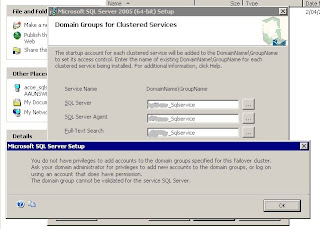
Domain Groups for Clustered Services - SQL 2005 failover cluster Setup


Microsoft KB on setting up Domain Group for SQL Server 2005 Cluster Setup.

http://support.microsoft.com/kb/915846


It is prerequisite for SQL 2005 Cluster setup.

http://msdn2.microsoft.com/en-us/library/ms345196.aspx

Reasons to set up domain groups
When you install a SQL Server 2005 failover cluster, SQL Server 2005 requires domain accounts to start the clustered services. The domain accounts must be added to a domain group.

When you perform a stand-alone installation of SQL Server 2005, SQL Server Setup creates local user groups and then adds the service accounts that you specify to these groups. The Setup program grants permissions for files and folders to these local user groups .

Although the Setup program can create local user groups, the local user groups are not visible to another computer in the failover cluster. When the current computer fails over to another computer, permissions that you grant to the local user groups on the current computer is not visible to another computer. Therefore, the Setup program requires that you provide a domain group that is accessible to all computers in the failover cluster. Then you must add the service account to the domain group when you install a SQL Server 2005 cluster. The Domain Groups for Clustered Services page of the SQL Server Installation Wizard will prompt you to enter the domain name and the group name for each clustered service that you are installing. The Setup program will not create local domain groups in the failover cluster. The Setup program only uses the domain group that you specify.

If you want to change your service account on a SQL Server 2005 cluster, make sure that your new service account is in the related domain group.

Thursday, March 20, 2008

How to find domain name using batch

@echo off
echo.
echo If no Domain is listed below, then you are not part of an NT Domain.
echo.
echo If so, please use your account from one of the supported NT domains,
echo.
echo.
echo.
echo Your current NT Logon is:
echo.

net config workstation | find "User"
net config workstation | find "Logon"

echo.
echo.
echo.
echo.
pause

Monday, February 11, 2008

SQL Server 2005 Default Configuration check list

SQL Server 2005 Configuration check list

http://technet.microsoft.com/en-us/library/ms189631.aspx

http://www.sql-server-performance.com/articles/audit/2005_server_configuration_pt1_p1.aspx

S.No Configuration option Minimum Value Maximum Value Default Value
1 Ad Hoc Distributed Queries (A) 0 1 0
2 affinity I/O mask -2147483648 2147483647 0
3 affinity64 I/O mask (A, only available on 64-bit version of SQL Server) -2147483648 2147483647
4 affinity mask (A) -2147483648 2147483647 0
5 affinity64 mask (A, only available on 64-bit version of SQL Server) -2147483648 2147483647 0
6 Agent XPs (A) 0 1 0
7 allow updates 0 1 0
8 awe enabled (A, RR) 0 1 0
9 blocked process threshold (A) 0 1 0
10 c2 audit mode (A, RR) 0 1 0
11 clr enabled 0 1 0
12 common criteria compliance enabled (A, RR) 0 1 0
13 cost threshold for parallelism (A) 0 32767 5
14 cross db ownership chaining 0 1 0
15 cursor threshold (A) -1 2147483647 -1
16 Database Mail XPs (A) 0 1 0
17 default full-text language (A) 0 2147483647 1033
18 default language 0 9999 0
19 default trace enabled (A) 0 1 1
20 disallow results from triggers (A) 0 1 0
21 fill factor (A, RR) 0 100 0
22 ft crawl bandwidth (max), see ft crawl bandwidth(A) 0 32767 100
23 ft crawl bandwidth (min), see ft crawl bandwidth(A) 0 32767 0
24 ft notify bandwidth (max), see ft notify bandwidth(A) 0 32767 100
25 ft notify bandwidth (min), see ft notify bandwidth(A) 0 32767 0
26 index create memory (A, SC) 704 2147483647 0
27 in-doubt xact resolution (A) 0 2 0
28 lightweight pooling (A, RR) 0 1 0
29 locks (A, RR, SC) 5000 2147483647 0
30 max degree of parallelism (A) 0 64 0
31 max full-text crawl range (A) 0 256 4
32 max server memory (A, SC) 16 2147483647 2147483647
33 max text repl size 0 2147483647 65536
34 max worker threads (A, RR) 128 32767 0
35 media retention (A, RR) 0 365 0
36 min memory per query (A) 512 2147483647 1024
37 min server memory (A, SC) 2147483647 8
38 nested triggers 0 1
39 network packet size (A) 512 32767 4096
40 Ole Automation Procedures (A) 0 1 0
41 open objects (A, RR, obsolete) 0 2147483647 0
42 PH_timeout (A) 1 3600 60
43 precompute rank (A) 0 1 0
44 priority boost (A, RR) 0 1 0
45 query governor cost limit (A) 0 2147483647 0
46 query wait (A) -1 2147483647 -1
47 recovery interval (A, SC) 0 32767 0
48 remote access (RR) 0 1 1
49 remote admin connections 0 1 0
50 remote login timeout 0 2147483647 20
51 remote proc trans 0 1 0
52 remote query timeout 0 2147483647 600
53 Replication XPs Option (A) 0 1 0
54 scan for startup procs (A, RR) 0 1 0
55 server trigger recursion 0 1 1
56 set working set size (A, RR, obsolete) 0 1 0
57 show advanced options 0 1 0
58 SMO and DMO XPs (A) 0 1 1
59 SQL Mail XPs (A) 0 1 0
60 transform noise words (A) 0 1 0
61 two digit year cutoff (A) 1753 9999 2049
62 user connections (A, RR, SC) 0 32767 0
63 User Instance Timeout (A, only appears in SQL Server 2005 Express Edition) 5 65535 60
64 user options 0 32767 0
65 Web Assistant Procedures (A) 0 1 0
66 xp_cmdshell (A) 0 1 0


Saturday, January 26, 2008

Find Uptime on Windows 2003, XP

To find uptime of Find Uptime on Windows 2003, XP boxes;

systeminfo | find "Up Time"

Wednesday, December 26, 2007

SQL 2005: Performance Counters are missing after installation

After installation of SQL Server 2005; Observed that SQL Server performance counters missing.

Below Query returns Zero rows.

select * from sys.dm_os_performance_counters
or
select * from sysperfinfo

Solution:
http://technet.microsoft.com/en-us/library/ms187743.aspx

Look at the setup log and search for error 3409, "Reinstall sqlctr.ini for this instance, and ensure that the instance login account has correct registry permissions" This denotes that performance counters were not enabled. The errors immediately prior to the 3409 listing should indicate the root cause for the failure of performance counter enabling.

For more information about setup log files, see How to: View SQL Server 2005 Setup Log Files

Tuesday, December 25, 2007

Error when executing sp_helpdb


Error below would occur:
Server: Msg 515, Level 16, State 2, Procedure sp_helpdb,
Line 53
Cannot insert the value NULL into column 'owner',
table 'tempdb.dbo.#spdbdesc_____________________________ ___
__________________________________________________ _________
________________000100048505'; column does not allow
nulls. INSERT fails.

Solution:

1) Run Query below, to find the databases which has incorrect owner.
SELECT name, SUSER_SNAME(sid)
FROM master.dbo.sysdatabases
WHERE SUSER_SNAME(sid) IS NULL
2) Execute
sp_changedbowner 'sa'


Powered by ScribeFire.

Sunday, December 23, 2007

How to find is Operating System is 32 Bit or 64 Bit

To find out if your operating system is 64bit or 32bit, open a
command prompt and type "SET Processor" <enter>. This will show
you all the environment variables that start with PROCESSOR. For
example, if your operating system is 64bit, whether AMD or Intel eith
EM64T extensions, you'll see:

PROCESSOR_ARCHITECTURE=AMD64

On an Intel Itanium you would see:

PROCESSOR_ARCHITECTURE=IA64


Powered by ScribeFire.

Monday, December 10, 2007

Bring the database which is in suspect

Steps intend to do to get the database online:

1. We then execute

Use Master
Go
sp_configure 'allow updates', 1
reconfigure with override
Go
- So that it would allow us to make changes directly to the SYSTEM tables(this option is used in extreme circumstances).

3. The following command lets us put the database in an emergency mode

Update SYSDATABASES set status = 32768 where name = 'SampleDB'
- In Emergency Mode it would allow us to perform certain actions which would not be possible in either Normal or Suspect Modes.


4. Having put the database in Emergency Mode we can then create a new log for the database since the current one can corrupt or inaccessible.


DBCC REBUILD_LOG('SampleDB', ‘C:\Data\SampleDB_newlog.ldf’)
- After this we can check the current files of the database using sp_helpfile command after changing the database context in the Query Analyzer to the affected database

5. We then check for consistency issues on the database by executing:
DBCC CHECKDB('SampleDB')
Go
- If the above command fails it usually recommends the next available option to use. You have to clearly understand the option before you try it since it could result in data-loss

6. Turn off the option to make direct changes to the SYSTEM tables using:
sp_configure 'allow updates', 0
reconfigure with override
Go

7. Then proceeded to take a complete database backup of the database.

Tuesday, November 13, 2007

Query to find computed columns

Query to find computed columns:

SELECT TABLE_NAME= OBJ.NAME,COLUMN_NAME=COL.NAME,FORMULA=CMT.TEXT
FROM SYSCOLUMNS COL, SYSOBJECTS OBJ, SYSCOMMENTS CMT
WHERE COL.ID = OBJ.ID
AND OBJ.ID = CMT.ID
AND COL.COLID = CMT.NUMBER
AND ISCOMPUTED = 1
AND OBJ.TYPE = 'U'

Tuesday, November 06, 2007

SET OPTION considerations when running DBCC with indexes on computed columns


SET OPTION considerations when running DBCC with indexes on computed columns

Error Message:
[Microsoft SQL-DMO (ODBC SQLState: 42000)] Error 1934: [Microsoft][ODBC SQL Server Driver][SQL Server]DBCC failed because the following SET options have incorrect settings: 'QUOTED_IDENTIFIER, ARITHABORT'.

Also refer KB: http://support.microsoft.com/kb/902388/en-us


Powered by ScribeFire.

Monday, August 20, 2007

Update stats on database with Read only

sp_updatestats would fail if a database on "Read Only" with below error

Server: Msg 3906, Level 16, State 1, Line 1
Could not run BEGIN TRANSACTION in database 'doctrack' because the database is read-only.
Updating dbo.doclink1

Sunday, August 19, 2007

SQL Server Performance Audit Checklist


Identify SQL Server Hardware Bottlenecks
Performance Audit Checklist


Counter Name Average Minimum Maximum
Memory: Pages/sec


Memory: Available Bytes


Physical Disk: % Disk time


Physical Disk: Avg. Disk Queue Length


Processor: % Processor Time


System: Processor Queue Length


SQL Server Buffer: Buffer Cache Hit Ratio


SQL Server General: User Connections