Showing posts with label Audit. Show all posts

Tuesday, September 25, 2012

How to find on which node SQL Server instance was running before restart?


In situation, where SQL Server instance running on a node is restarted usually after Windows Operating System patching or for some other reason, there may be need to find to which node the SQL Server instance was running on before.

Here is the solution for this;

By default whenever SQL Server instance restarted on Clustered Environment, on SQL Server Error Log it will post the message below;

The NETBIOS name of the local node that is running the server is 'ClusterNode1'.

So, making use of the xp_ReadErrorLog we can query the ErrorLog and find the details.

-- To know the list available Error log files
exec xp_enumerrorlogs 1


-- Search the available error log files
exec xp_ReadErrorLog 0, 1 , 'NETBIOS name of the local node'
exec xp_ReadErrorLog 1, 1 , 'NETBIOS name of the local node'
exec xp_ReadErrorLog 2, 1 , 'NETBIOS name of the local node'
exec xp_ReadErrorLog 3, 1 , 'NETBIOS name of the local node'
exec xp_ReadErrorLog 4, 1 , 'NETBIOS name of the local node'
exec xp_ReadErrorLog 5, 1 , 'NETBIOS name of the local node'

Tuesday, May 03, 2011

Change Tracking Vs. Change Data Capture ( CDC ) in SQL Server 2008


Here we find the difference between the Change Track vs Change Data Capture in SQL Server 2008. Both helps in tracking the table changes and security compliance.

Change Track Change Data Capture – CDC
It is about fact:
It captures only the fact as the tracking table has changed. It does NOT capture the data.
Therefore, change tracking is more limited in the historical questions it can answer compared to change data capture. However, for those applications that do not require the historical information, there is far less storage overhead because of the changed data not being captured
It is about the Data:
Change data capture provides historical change information for a user table by capturing both the fact that DML changes were made and the actual data that was changed.

Storage:
Internal tables are placed on the same filegroup as the parent entity. You could use the sys.internal_tables catalog view to show all the internal tables and parent entities. For example:
select name, object_name(parent_id) as parent_object from sys.internal_tables

Storage:
When change data capture is enabled for a database, a few things are added to the database, including a new schema (called cdc), some metadata tables, and a trigger to capture Data Definition Language (DDL) events.

The two function names are, respectively, fn_cdc_get_all_changes_ and fn_cdc_get_net_changes_, with the capture instance name appended. Note that (like the change tracking feature) this functionality requires the table to have a primary key or other unique index.
Supported on “Simple” recovery model also.
It is recommended that you use snapshot isolation when change tracking is enabled. Snapshot isolation itself can add significant workload overhead and requires much more careful management of tempdb.
Prevents Log truncation.
Forces full logging of some bulk operations.

One major point to note here is that once change data capture is enabled, the transaction log behaves just as it does with transactional replication—the log cannot be truncated until the log reader has processed it. This means a checkpoint operation, even in SIMPLE recovery mode, will not truncate the log unless it has already been processed by the log reader.
It uses synchronous tracking mechanism.
once a database is enabled for change tracking, a version number is instituted, which allows ordering of operations
Change Data Capture (CDC) uses the asynchronous process that reads the transaction log.
Change Tracking has minimal impact on the system. It has almost nil impact as it asynchronous mechanism reads from the transaction log.
It uses TempDB heavily It uses transaction log.
DDL Restriction:
There are restrictions on the DDL that can be performed on a table being tracked. The most notable restriction is that the primary key cannot be altered in any way. The other restriction worth calling out here is that an ALTER TABLE SWITCH will fail if either table involved has change tracking enabled.
No such DDL restriction
SQL Agent not needed It requires SQL Agent to be running.
SQL Agent Job & Transaction Replication:
Two SQL Agent jobs may be created: the capture job and the cleanup job. I say "may be created" because the capture job is the same as the one used for harvesting transactions in transactional replication.
If transactional replication is already configured, then only the cleanup job will be created and the existing log reader job will also be used as the capture job
Permission required to enable: SYSADMIN Permission required to enable: DBOwner


Reference:

Comparing Change Data Capture and Change Tracking

Tracking Changes in your Enterprise

Wednesday, July 14, 2010

How to find who dropped the database? Is that logged on SQL Server?


Are you one looking to find answer for questions like below.,

· How to find who dropped a database?

· How to find who created the database?

· How to find who altered the database?

· How to find who altered the database configurations?

· How to find who dropped the schema?

· How to find who altered the schema?

· How to find who altered the server configuration?

· How to find who modified the login?

· How to find who modified the table?

If it is then,  are you wondering is that possible on SQL Server?

Yes, SQL Server can beginning from version SQL Server 2005 onwards.

That is where SQL Server Default trace come into picture.

What is SQL Server Default Trace?

Default trace provides troubleshooting assistance to database administrators by ensuring that they have the log data necessary to diagnose problems the first time they occur.

To get the default trace options

SELECT * FROM ::fn_trace_getinfo(default)

To know what is audited on default trace

SELECT Trc.EventID, Trc.ColumnID, Evt.name as Event_Description, Col.name as Column_Description

  FROM ::fn_trace_geteventinfo(1) Trc

    JOIN sys.trace_events Evt ON Trc.eventID = Evt.trace_event_id

    JOIN sys.trace_columns Col ON Trc.columnid = Col.trace_column_id


image

Example:

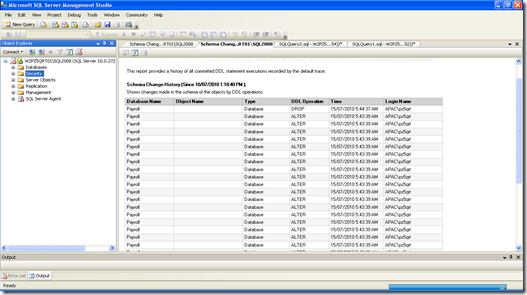
Below is the screenshot  “Schema Changes History” of Standard Reports at Server Level.

See that “it shows the event of Drop and Alter of the database
 image

The same can be queried from SQL Server Default Trace like;

select * from fn_trace_gettable('C:\Program Files\Microsoft SQL Server\MSSQL10.SQL2008\MSSQL\Log\log.trc',DEFAULT)
where EventClass in (46,47,164) and EventSubclass = 0 and DatabaseID <> 2

Usage
Default trace can be queried to find answers on

  1. To finmd the Create / Alter / Drop i.e., DDL changes at Database,Schema and Object level
  2. To find the configuration changes at SQL Server Instance, Database, Schema and Object Level
  3. To find Login creation , modifications and failures
  4. To find performance issues like missing of statistics, join predicate, hash or sort warnings
  5. Database file growth or shrinkage
  6. DBCC operations


Points to ponder

  1. Default trace is a Server Side trace and it is enable by default.
  2. Default trace properties can not be modified, other than enabling and disabling of this trace.
  3. Default trace by default enabled and stored on the “Log” folder

    image
  4. Default trace file will be created newly on start of the SQL Server service.
  5. A single trace file can store  up to 20 MB, when it is full new file will be created.
  6. SQL Server would maintain 5 default trace file, where the file with highest number is the latest.
  7. Default trace is light weight and it is not replacement for DDL Trigger. Default trace log only basic information, when detailed information needed DDL trigger is the option.

Saturday, May 29, 2010

Query to find when the table last accessed on SQL Server 2005 and above


------ Query to find when the User Table Last accessed ---------

WITH LastActivity (ObjectID, LastAction)
AS
(
SELECT object_id AS TableName, Last_User_Seek as LastAction
FROM sys.dm_db_index_usage_stats u
WHERE database_id = db_id(db_name())
UNION
SELECT object_id AS TableName,last_user_scan as LastAction
FROM sys.dm_db_index_usage_stats u
WHERE database_id = db_id(db_name())
UNION
SELECT object_id AS TableName,last_user_lookup as LastAction
FROM sys.dm_db_index_usage_stats u
WHERE database_id = db_id(db_name())
)
SELECT OBJECT_NAME(so.object_id)AS TableName,
    MAX(la.LastAction)as LastSelect
FROM
sys.objects so
LEFT JOIN LastActivity la
ON so.object_id = la.ObjectID
WHERE so.type = 'U'
AND so.object_id > 100
GROUP BY OBJECT_NAME(so.object_id)
ORDER BY OBJECT_NAME(so.object_id)

------ Query to find when the Database Last accessed ---------

SELECT name, last_access =(
                select X1= max(bb.xx)
                from ( select xx =
                        max(last_user_seek)
                        where max(last_user_seek)is not null
                        union all
                        select xx = max(last_user_scan)
                        where max(last_user_scan)is not null
                        union all
                        select xx = max(last_user_lookup)
                        where max(last_user_lookup) is not null
                        union all
                        select xx =max(last_user_update)
                        where max(last_user_update) is not null) bb)
FROM master.dbo.sysdatabases d
left outer join sys.dm_db_index_usage_stats s
on d.dbid= s.database_id
group by d.name

Deny specific user from Remote Login to SQL Server

SQL Server Query to deny user on remote login feature, let user connect to database engine only from localhost (or 127.0.0.1).

This query below applies to SQL Server 2005 with SP2 and above higher version. It uses the SQL Server Logon Trigger


CREATE TRIGGER Deny_Remote_Login_Login1_trigger

ON ALL SERVER WITH EXECUTE AS 'sa'

FOR LOGON

AS

BEGIN

IF ORIGINAL_LOGIN()= 'Login1' AND

(SELECT * FROM sys.dm_exec_sessions

WHERE is_user_process = 1 AND

original_login_name = 'Login1' --- Checking the given login

and Host_Name not in ( 'SQLServerHostName') --- Connecting Remotely

and Session_ID = @@SPID )

BEGIN

PRINT 'RemoteLogin Attempt attempt of ' + ORIGINAL_LOGIN()+' denied, please login locally'

ROLLBACK;

END

END;