Showing posts with label Setup. Show all posts

Tuesday, July 12, 2011

Silent Mode Installation of SQL Server 2008 SP2


Here is the command for SQL Server 2008 Express Edition Silent mode installation of SP2.

SQLEXPR_x86_ENU.exe /Q /ACTION=PATCH /INSTANCENAME=SQLEXPRESS

Thursday, October 14, 2010

SQL Server 2008 Service Pack 2 - Installation


Here Let me show the step by step on SQL Server 2008 SP 2 Installation

image

image

image

image

image

image


image

image

image

Thursday, October 07, 2010

SQL Server 2008 Service account Privileges


Please refer the http://msdn.microsoft.com/en-us/library/ms143504.aspx 
on setting up Windows Service Accounts.

It discuss about the

  • Domain User Account
  • Local User Account
  • Local Service Account
  • Network Service Account
  • Local System Account
  • Windows NT Rights and Privileges Granted for SQL Server Service Accounts
  • Access Control Lists Created for SQL Server Service Accounts
  • Windows Permissions for SQL Server Services

Wednesday, October 06, 2010

Can we have SQL Server 2000 default Instance and SQL Server 2005 default Instance on the same server?


The default instance could be an installation of

SQL Server 2000,
SQL Server 2005,
SQL Server 2008, or
SQL Server 2008 R2.

Only one installation of SQL Server, regardless of version, can be the default instance at one time

Friday, April 23, 2010

SQL Server Default Collation

Technorati Tags:


SQL Server Default CollationDefault_Collation

Thursday, May 08, 2008

SQL Server 2005 Installation takes longer time


SQL Server 2005 Installation takes longer time


KB Article Number(s): 910070, 917872, 918105, 919357
Language: English
Platform: x64
Location: (http://hotfixv4.microsoft.com/SQL%20Server%202005/nosp/All_SQL2005_Hotfix_1546/09.00.1546.00/free/273291_ENU_x64_zip.exe)
Password: $@fBYZW
Password Changes On: 04/10/2008
Next Password: eXzd@+RVK

Tuesday, April 08, 2008

MSI Installer issue on SQL 2005 Setup

Error Message:
The Windows Installer Service could not be accessed. This can occur if you are running Windows in safe mode, or if the Windows Installer is not correctly installed. Contact your support personnel for assistance.
Source:
File:
C:\Program Files\Microsoft SQL Server\90\Setup Bootstrap\LOG\Files
• SQLSetup0001_BOXNAME_SQL.log
• SQLSetup0003_BOXNAME_SQL.log

MSI (s) (68:E8) [23:38:12:124]: Product: Microsoft SQL Server 2005 (64-bit) -- Error 1719. The Windows Installer Service could not be accessed. This can occur if you are running Windows in safe mode, or if the Windows Installer is not correctly installed. Contact your support personnel for assistance.

Resolution:
Error message when you try to add or remove a program on a computer that is running Windows XP or Windows Server 2003: "The Windows Installer service could not be accessed"

http://support.microsoft.com/kb/315346

Saturday, April 05, 2008

Error message when you install SQL Server 2005


Error message when you install SQL Server 2005: "The file C:\Windows\Microsoft.NET\Framework\Meaningless_string\mscorlib.tlb could not be loaded"

href="http://support.microsoft.com/kb/918685

Reason for the Error:
This issue occurs because the path of the Mscorlib.tlb file is incorrectly interpreted during the Setup process.

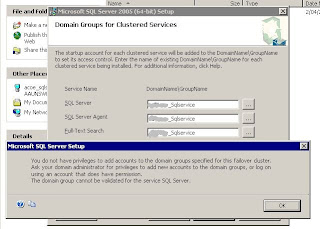
Domain Groups for Clustered Services - SQL 2005 failover cluster Setup


Microsoft KB on setting up Domain Group for SQL Server 2005 Cluster Setup.

http://support.microsoft.com/kb/915846


It is prerequisite for SQL 2005 Cluster setup.

http://msdn2.microsoft.com/en-us/library/ms345196.aspx

Reasons to set up domain groups
When you install a SQL Server 2005 failover cluster, SQL Server 2005 requires domain accounts to start the clustered services. The domain accounts must be added to a domain group.

When you perform a stand-alone installation of SQL Server 2005, SQL Server Setup creates local user groups and then adds the service accounts that you specify to these groups. The Setup program grants permissions for files and folders to these local user groups .

Although the Setup program can create local user groups, the local user groups are not visible to another computer in the failover cluster. When the current computer fails over to another computer, permissions that you grant to the local user groups on the current computer is not visible to another computer. Therefore, the Setup program requires that you provide a domain group that is accessible to all computers in the failover cluster. Then you must add the service account to the domain group when you install a SQL Server 2005 cluster. The Domain Groups for Clustered Services page of the SQL Server Installation Wizard will prompt you to enter the domain name and the group name for each clustered service that you are installing. The Setup program will not create local domain groups in the failover cluster. The Setup program only uses the domain group that you specify.

If you want to change your service account on a SQL Server 2005 cluster, make sure that your new service account is in the related domain group.